The problem: I wanted a site that edits like Notion, but ships like a product
I wanted three things at once:
- A writing environment that feels frictionless: Notion.
- A website that is fast, secure, and cheap to host: a static build.
- A workflow that scales across bilingual content, consistent metadata, and reliable images.
The usual trade-off is awkward. A “Notion site” can feel easy to edit, but often depends on runtime API calls. A static site is fast and reliable, but editing usually becomes more technical.
My goal was simple: edit in Notion, publish as static.
The core idea
Notion is the source of truth. The website is the build artifact.
Instead of treating the website as something that reads Notion live, I treat Notion as the content studio. At build time, the site fetches content from Notion, renders it, and outputs plain static HTML. The live website does not need Notion API calls at runtime.
That gives me the editing experience I want without making the public site depend on Notion every time someone opens a page.
How content is structured in Notion
1. Posts database
Blog posts live as rows in a Notion database.
Each post has metadata fields that map cleanly to the website:
- Title.
- Slug.
- Excerpt.
- Date.
- Tags.
- Language.
- Published.
The key rule is bilingual pairing: every post exists as two separate rows, one English and one Arabic. Both rows share the same slug so the site can resolve the English and Arabic versions predictably.
2. Portfolio database
Portfolio items are also rows in Notion.
They follow the same bilingual pattern and can link to long-form case studies through the shared slug. That means a short portfolio card and a full case-study post can stay aligned without duplicating the whole system.
Why this is powerful
Using Notion this way is less about “turning Notion pages into web pages” and more about turning content into a system.
Publishing is a filter, not a deployment
Publishing becomes editorial work:
- Check the Published property in Notion.
- Run the build.
- The static site updates.
That small shift matters. It lets me treat publishing as content management, not engineering.
Metadata becomes enforceable
Because every piece of content is a database row, consistency becomes visible:
- Required fields are either present or clearly missing.
- Tags come from a controlled set.
- Language and slug pairing rules are unambiguous.
- Drafts and published content can be filtered cleanly.
Bilingual content becomes first-class
Bilingual sites often drift because the translation lives somewhere else.
Here, the English and Arabic versions are visible as paired rows with the same slug. That makes parity checks easier and reduces translation drift.
Where AI fits
I use a custom Notion agent as the editorial layer.
Its job is to help turn raw Notion drafts into publish-ready website content without breaking the static pipeline.
The agent can:
- Audit metadata: slugs, required fields, tags, language pairing.
- Edit and tighten copy while respecting the site’s constraints.
- Keep English and Arabic pairs aligned.
- Protect non-negotiables such as image mirror annotations.
This turns the workflow into something closer to having an editor who also understands the publishing system.
The hidden hard problem: images
Notion-hosted image URLs are temporary. That is fine inside Notion, but risky for a static site.
So the build includes an image pipeline:
- Published Notion pages are scanned for images.
- Notion-hosted images are copied to Cloudinary.
- The build swaps temporary Notion URLs for permanent Cloudinary URLs.
- A reference line is written back into Notion under each image so the mapping stays stable.
The editorial rule is simple: do not delete or modify the Cloudinary reference lines.
A non-technical visual of the setup
Below is a simple systems view of the workflow.
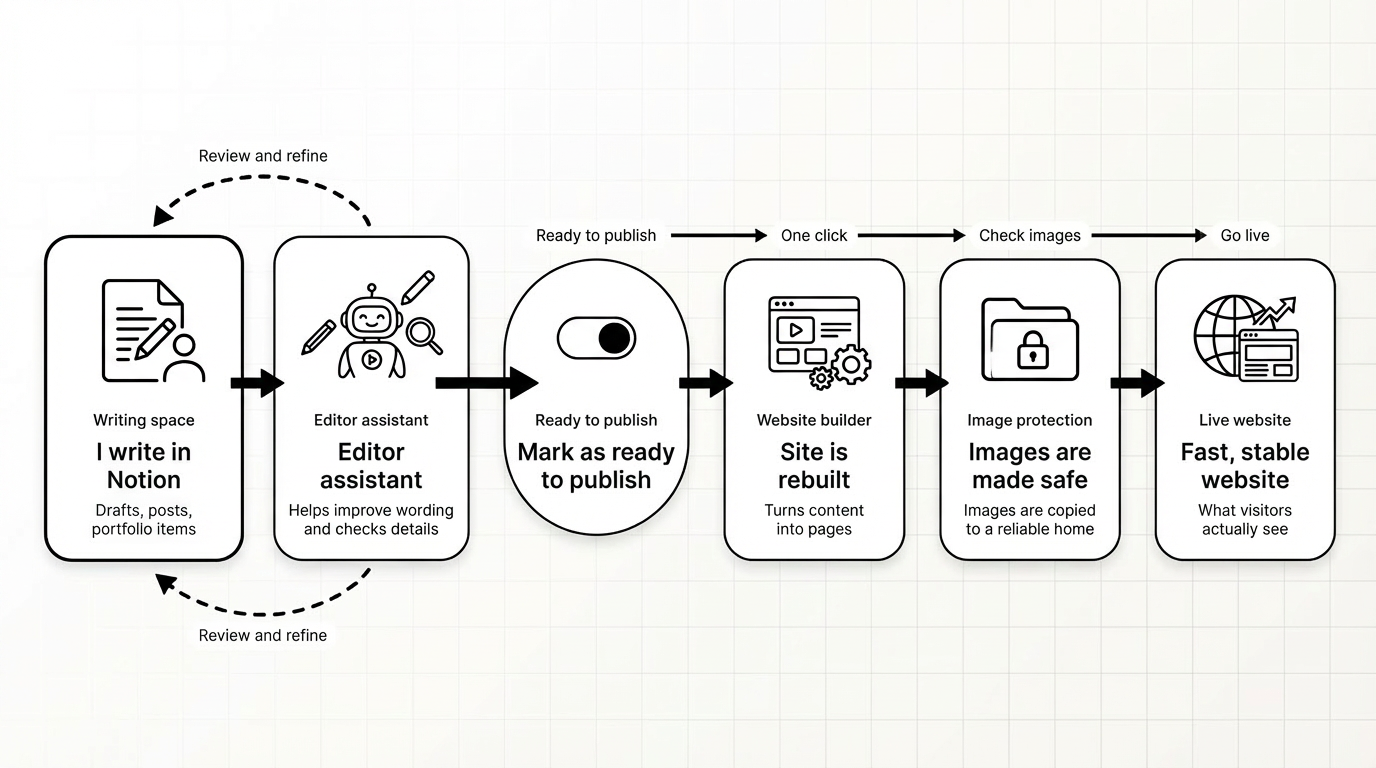
In one sentence: Notion is where content lives; the build turns it into a fast website; the agent keeps the content consistent.
What changed in the website
Over time, the site evolved from a basic bilingual website into a Notion-driven publishing workflow:
- Bilingual blog pages were added with Notion integration.
- The image migration pipeline made static pages safer.
- The same approach expanded to portfolio items, screenshots, and case-study linking.
- Editorial checks became part of the workspace instead of living in my memory.
The bigger takeaway
Notion-as-CMS becomes powerful when you stop thinking of it as a page exporter and start treating it as:
- A structured content database.
- An editorial workflow.
- A publish gate.
- A system that can be audited, edited, and improved.
Once that exists, AI can be introduced safely; not as a content generator floating outside the system, but as an editor that understands the rules of the system.